Essential Tech Visuals: 50 Computer Hardware Icons
When you are building a digital product, designing a website, or setting up a new IT startup, the visual language you use speaks volumes before a user even reads a word. We often get caught up in the perfect font pairing or the exact hex code for a brand color, but the supporting graphics—specifically icons—play an equally critical role in user experience and brand identity. This is where a versatile asset like the 50 Computer Hardware Line & Color Icons becomes indispensable for your toolkit. It bridges the gap between complex technical concepts and clean, digestible visual communication.
The Anatomy of a Modern Icon Set
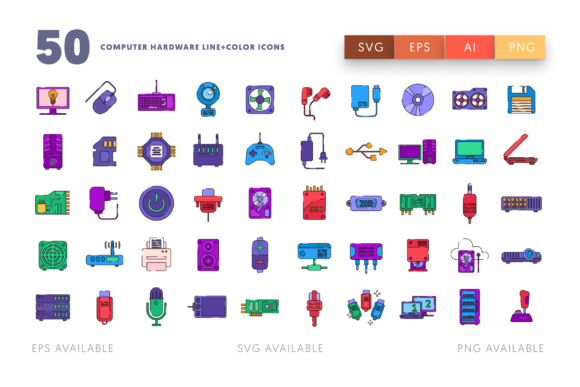
At its core, this collection is built around the essentials of modern computing. You aren't just getting generic clip art; you are getting a curated visual library that includes everything from the internal architecture, like the motherboard and CPU, to the peripherals we use daily, such as the keyboard, mouse, and monitor. The set even covers connectivity with specific assets for the HDMI port, HDMI cable, and USB cable. For those working on storage solutions or cloud computing interfaces, the inclusion of the hard disk, SSD card, and disk ensures you have the right symbol to represent data management.
What makes these design assets particularly effective is their dual nature. You get both line art and filled color versions. This is crucial for web design and UI/UX work. The line icons work beautifully for inactive states or minimalist layouts, while the color versions can guide the user's eye toward active elements or important features. Whether you are illustrating a cooling system with the computer fan or setting up audio inputs with the microphone and loudspeaker, the visual consistency remains tight and professional.
Integrating Icons into Brand Identity and Marketing
Icons are not just functional; they are a key part of your brand identity. If you are an entrepreneur launching a SaaS product or a small business owner setting up an e-commerce store for PC parts, your graphics need to match your modern typography. A mismatch between a high-end sans serif font and low-quality clipart can destroy trust instantly.
Imagine you are designing a landing page for a video editing service. You need to explain the technical requirements to your clients. Using the camera icon next to your video specs, or the TV cables icon to explain output options, provides immediate context. It reduces cognitive load for the reader. In social media graphics, where attention spans are short, a sharp icon of a receiver or an SSD card can stop the scroll and convey a technical benefit faster than a paragraph of text.
For editorial design—think tech magazines or blog posts—these icons serve as excellent visual breaks. They guide the reader through sections without disrupting the flow of the text. Unlike heavy stock photography, these vector graphics are lightweight and scalable, ensuring your page load times remain fast, which is a critical factor for SEO and user retention.
Practical Applications for Creators and Developers
The utility of this set extends far beyond just making things look pretty. It is about solving visual problems efficiently. Here is how different professionals can leverage these premium font companions and graphic elements:
- UI/UX Designers: Use the monitor and screen icons for dashboard interfaces. The clean lines ensure readability at small sizes, which is vital for mobile responsiveness.
- Content Marketers: Break up long-form blog posts about hardware reviews. An icon of a hard disk or CPU can visually anchor a section about performance specs.
- Educators and Publishers: Create worksheets or course materials that explain computer internals. The visual representation of a motherboard or USB cable helps students grasp abstract concepts.
- Small Business Owners: Create professional-looking invoices or service menus for IT repair shops. Listing "Virus Removal" next to a computer icon or "Hardware Upgrade" next to a CPU icon adds a layer of professionalism that generic templates lack.
Technical Flexibility: The Vector Advantage
One of the biggest headaches in design is working with assets that pixelate when you resize them. This collection solves that by providing vector files. The package includes an Ai file for those deep in the Adobe ecosystem, allowing you to easily customize text, colors, and sizes without losing quality. This is perfect for logo design elements where you might need to tweak a hardware icon to fit a specific lockup.
For those who prefer other workflows, the inclusion of EPS files ensures compatibility with almost any design program. If you are using Sketch or Inkscape, the SVG files are ready to go. This versatility is a massive time saver. You don't have to waste hours converting files or tracing bitmaps. The 512 x 512 px PNG files are also included for quick use in presentations or social media posts where vector editing isn't necessary.
Consider the specific assets included: the mouse, the keyboard, the camera, and the TV cables. These are high-frequency items in tech communication. Having them available as separate files (50 separate EPS, SVG, and PNG files) means you can drag and drop exactly what you need without opening a massive master file. This modularity supports a fast-paced design environment.
Elevating Your Visual Hierarchy
Good design is about hierarchy. It tells the viewer what to look at first, second, and third. Icons are a powerful tool for establishing this hierarchy. When you pair a bold display font with a clean icon set, you create a visual rhythm.
For example, in packaging design for a tech accessory, you might use the HDMI cable icon to denote compatibility on the front of the box. Inside, you could use the microphone or loudspeaker icons to illustrate features. This consistency reinforces the product's quality. It signals to the customer that the brand pays attention to details.
Furthermore, in the realm of commercial font usage and branding, consistency is king. Using the same style of icons across your website, your email newsletters, and your print materials creates a cohesive ecosystem. When a customer sees the same stylized mouse or receiver on a Facebook ad that they saw on your invoice, it builds recognition. That recognition eventually turns into trust.
Ultimately, the 50 Computer Hardware Line & Color Icons are more than just pictures of electronics. They are a functional design system. They help you communicate complex technical information with clarity, maintain a professional brand identity, and streamline your workflow with flexible file formats. Whether you are designing a complex dashboard or a simple flyer, having these reliable assets in your library ensures you are always ready to present your best visual work.